 Source Files
Commit Messages
Every commit Source Files makes uses one message template that you set in Settings. It starts as Modified by www.SourceFiles.app, and placeholders name the file and what happened to it.
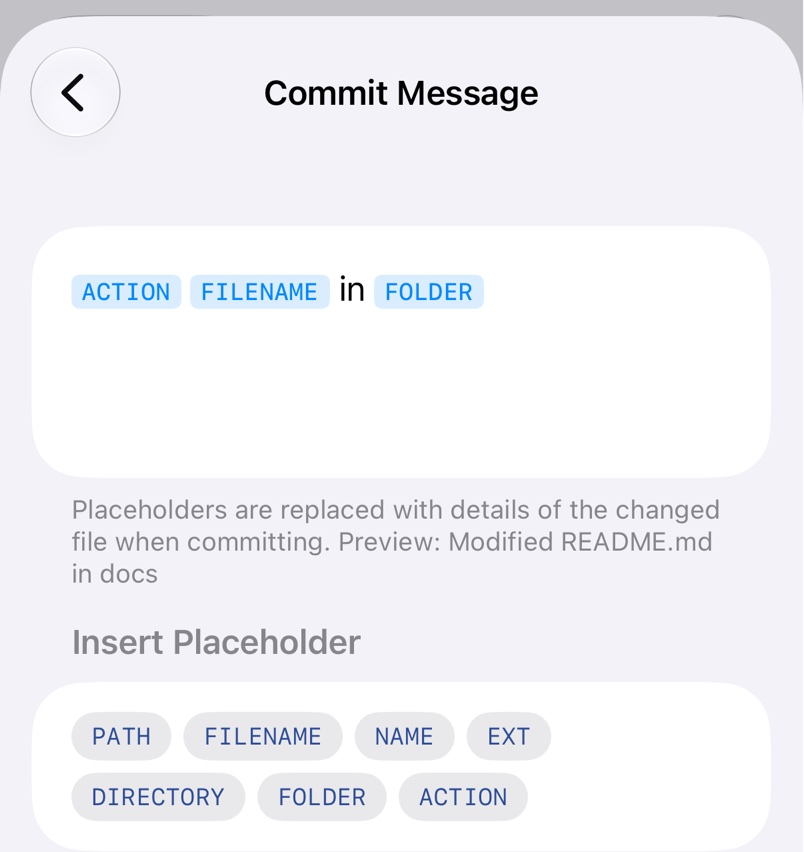
Write the message
On iPhone and iPad, open Settings in Source Files and tap the row under Commit Message. On a Mac, open Settings → Finder. Add placeholders with the buttons below the field. For a change to site/docs/README.md:
${PATH}issite/docs/README.md${FILENAME}isREADME.md${NAME}isREADME${EXT}ismd${DIRECTORY}issite/docs${FOLDER}isdocs${ACTION}isModified,DeletedorMoved, withMovedon both commits of a move or rename
With ${ACTION} ${FILENAME} from my iPad, saving README.md commits as Modified README.md from my iPad. Clear the field to go back to the default. The template isn't synced, so set it on each device.
In Shortcuts
The Upload to Git action has its own Commit Message parameter, which replaces the template when filled in. See Shortcuts Automation.