 Source Files
Remove Source Files from Finder after deleting the app
Deleting Source Files from your Mac can leave its Source location in the Finder sidebar and its folder in ~/Library/CloudStorage.
Click Source under Locations in the Finder sidebar; older versions of Source Files left it named Finder. If it isn't there, choose Go → Go to Folder…, enter ~/Library/CloudStorage/Source and press Return.
Finder says The application “Source” could not be found. Click Delete “Source”… in the upper right corner of the window and confirm, and Finder removes the folder and the sidebar entry.
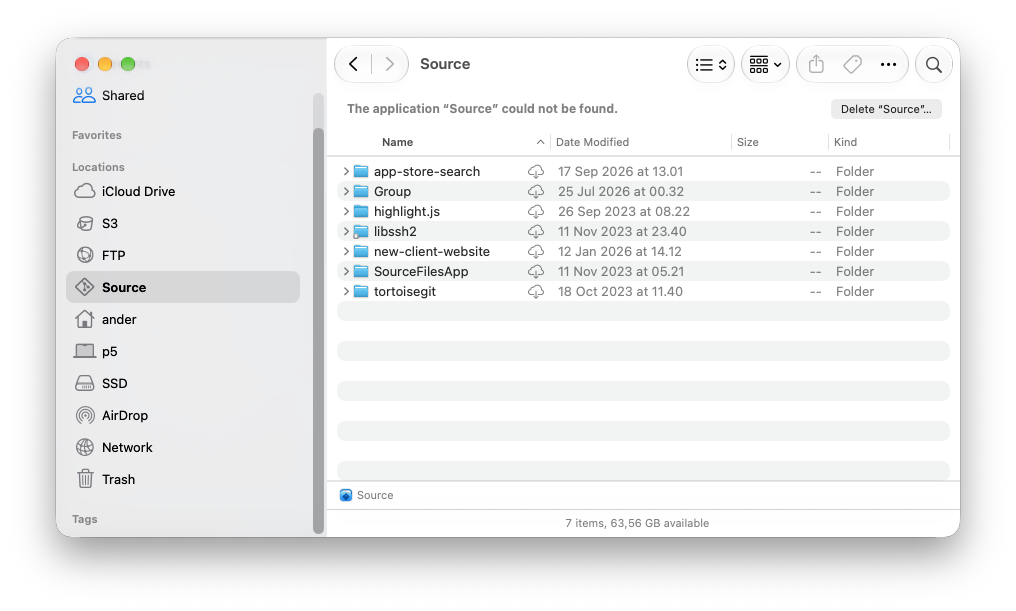
Your repositories aren't affected: nothing is deleted on the service. Only the copies on this Mac are removed, including changes that hadn't uploaded yet.